Sign PDF online for free with PDFPilot4U. Add your electronic signature to PDF documents securely without printing or installing software. Fast, easy, and works on any device.
Sign PDF Online for Free – Add Your Signature to PDF in Minutes
Signing documents is an essential part of both personal and professional life. Whether you're approving a business contract, accepting an offer letter, signing a rental agreement, completing government paperwork, or authorizing financial documents, signatures are often required before a document becomes official.
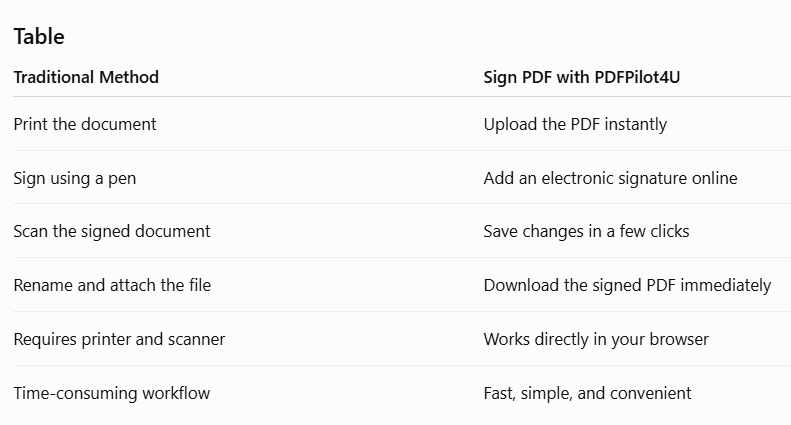
Traditionally, signing a PDF meant printing the document, signing it by hand, scanning it again, and then sending it back. While this process works, it's time-consuming, inconvenient, and often unnecessary in today's digital world.
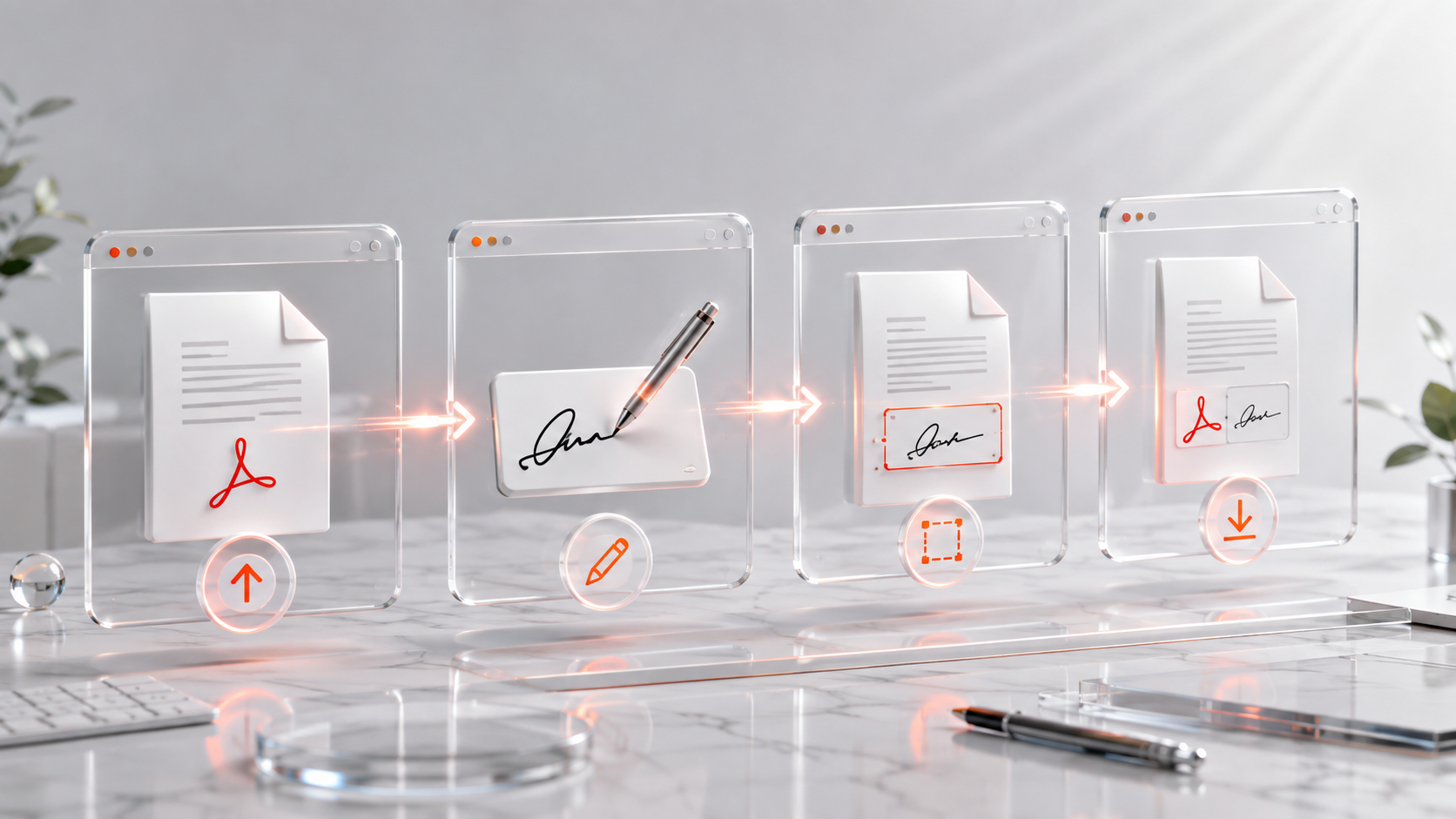
With PDFPilot4U Sign PDF, you can sign PDF documents online in just a few clicks. There's no need to print papers, install software, or learn complex editing tools. Simply upload your PDF, add your signature, position it where needed, and download the signed document within minutes.
Whether you're a student submitting application forms, an HR professional sending offer letters, a freelancer signing client agreements, or a business owner approving contracts, signing PDFs online helps you work faster while keeping your workflow simple and organized.
In this guide, you'll learn what a PDF signature is, how electronic signatures work, when you should sign PDF files online, and why PDFPilot4U is a convenient solution for everyday document signing.
What Does It Mean to Sign a PDF?
Signing a PDF means adding your signature to a PDF document to confirm approval, agreement, or authorization. Instead of printing the document and signing it with a pen, you can place your signature digitally and save the completed file instantly.
Online PDF signing has become a preferred option because it reduces paperwork, speeds up approvals, and allows documents to be signed from almost anywhere.
Common documents that people sign include:
Employment offer letters
Business contracts
Non-disclosure agreements (NDAs)
Rental agreements
Consent forms
School and college application forms
Government documents
Client proposals
Service agreements
Financial paperwork
A signed PDF is easier to share, archive, and manage than paper documents, making it a practical choice for individuals and businesses alike.
Electronic Signature vs Digital Signature
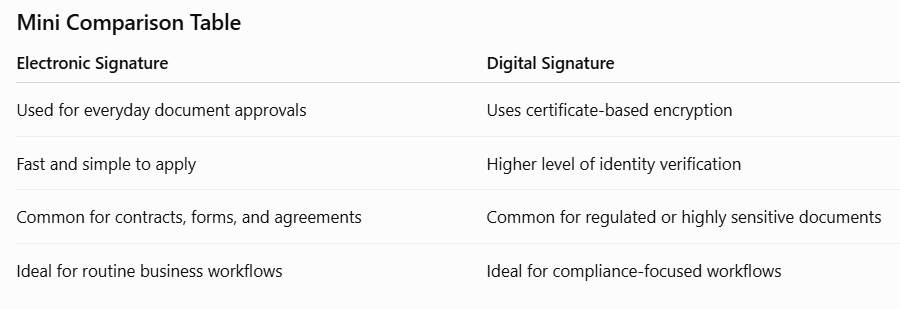
Although the terms are often used interchangeably, an electronic signature and a digital signature are not exactly the same.
An electronic signature is any digital representation of your signature added to a document to indicate approval or consent. It is commonly used for everyday business documents, agreements, and forms.
A digital signature, on the other hand, uses encryption and certificate-based technology to verify the authenticity of the signer and ensure that the document has not been modified after signing. Digital signatures are generally used for highly regulated or legally sensitive workflows.
For most day-to-day document signing needs, an electronic signature is the fastest and most convenient option.
Why More People Are Signing PDFs Online
The way we work has changed significantly over the past few years. Businesses, educational institutions, freelancers, and remote teams increasingly rely on digital documents instead of printed paperwork.
Online PDF signing offers several advantages over the traditional print-sign-scan process.
Save Valuable Time
Printing, signing, scanning, and emailing documents can take several minutes—or even longer if you don't have immediate access to a printer or scanner.
With an online PDF signing tool, the same task can often be completed in just a few clicks.
Work from Anywhere
Whether you're at home, in the office, traveling, or working remotely, you can sign PDF documents directly from your browser using your laptop, tablet, or smartphone.
Reduce Paper Usage
Digital signatures help minimize paper consumption and support a more environmentally friendly workflow.
Faster Approvals
Instead of waiting for printed documents to be signed and returned, online signatures allow agreements to move forward much more quickly.
Better Organization
Digitally signed PDFs are easier to store, search, and share than physical documents. Everything stays organized in one secure file.
Benefits of Using PDFPilot4U Sign PDF
Choosing the right PDF signing tool can make document management much easier. PDFPilot4U is designed to simplify the signing process while keeping the experience fast and user-friendly.
No Software Installation
Everything works directly in your web browser. There's no need to install additional applications or desktop software.
Beginner-Friendly Interface
You don't need technical expertise to sign a PDF. The interface is simple, clean, and easy to navigate, making it suitable for both first-time users and professionals.
Works Across Devices
Whether you're using Windows, macOS, Android, iPhone, or a tablet, PDFPilot4U allows you to sign PDF files from almost any modern device.
Faster Document Workflow
Instead of switching between printing, scanning, and emailing, you can complete the entire signing process online, saving both time and effort.
Professional Appearance
Adding a clean electronic signature to your PDF helps create a polished and professional document that's ready to share with employers, clients, colleagues, or organizations.
Who Uses an Online PDF Signing Tool?
Online PDF signing is useful for almost everyone who works with digital documents.
Students
Students often need to sign scholarship forms, internship agreements, admission documents, and project declarations before submission.
HR Professionals
HR teams regularly send and receive offer letters, employee agreements, policy acknowledgements, and onboarding documents that require signatures.
Freelancers
Freelancers frequently sign client contracts, service agreements, project proposals, and invoices before beginning new work.
Business Owners
Business owners use electronic signatures to approve contracts, quotations, purchase orders, and partnership agreements without unnecessary delays.
Legal and Administrative Teams
Legal departments and administrative professionals handle documents that require quick approvals while maintaining an organized digital workflow.
Why Choose PDFPilot4U Sign PDF?
Many online PDF signing tools are available today, but the best solution is one that combines simplicity, speed, and convenience.
PDFPilot4U Sign PDF is designed to help users sign PDF documents without unnecessary steps. You can upload your file, add your signature, adjust its position, and download the signed PDF in just a few moments.
Whether you're signing a single document or preparing multiple agreements for clients or employees, PDFPilot4U helps streamline the entire process.
In the next section, we'll walk through the exact steps to sign a PDF online using PDFPilot4U, along with practical use cases, common mistakes to avoid, and best practices for creating professional signed documents.
How to Sign a PDF Online Using PDFPilot4U
Signing a PDF with PDFPilot4U is quick and straightforward. You don't need to download software, install plugins, or create an account. Everything happens directly in your browser, making the process simple for both first-time users and professionals.
The tool works online, so you can access it from your laptop, desktop, tablet, or smartphone.
Step 2: Upload Your PDF Document
Click the upload button and choose the PDF file you want to sign.
Whether it's an employment agreement, contract, application form, invoice, or business proposal, the tool allows you to prepare it for signing within seconds.
Step 3: Create or Add Your Signature
You can add your signature using the available signing options.
Position the signature exactly where it's required in the document. Make sure it doesn't overlap important text or form fields.
Take a moment to review the placement before moving to the next step.
Step 4: Save the Changes
Once you're satisfied with the signature placement, apply the changes to your PDF.
The document is updated while keeping the rest of the content intact.
Step 5: Download Your Signed PDF
Download the completed document and keep it for your records or share it immediately with clients, employers, colleagues, or organizations.
The entire process takes only a few minutes and eliminates the need for printing and scanning.
Why Choose PDFPilot4U to Sign PDFs?
Signing documents should be simple—not a lengthy process involving printers, scanners, and multiple software applications.
PDFPilot4U is built to help you complete document signing quickly while maintaining a smooth user experience.
Fast Online Signing
Complete the signing process in just a few minutes without unnecessary steps.
No Downloads Required
Everything works directly in your browser, helping you save device storage and avoid software installation.
Easy for Everyone
The clean and intuitive interface makes signing PDFs simple, whether you're a student, freelancer, HR professional, or business owner.
Access from Any Device
Use PDFPilot4U on Windows, macOS, Android, iPhone, or tablet whenever you need to sign documents.
Organized Digital Workflow
Instead of printing paperwork, you can sign, save, and share documents digitally, making your workflow faster and more efficient.
Real-Life Situations Where Signing PDFs Saves Time
Electronic signatures are useful in many everyday situations.
Accepting a Job Offer
Candidates can sign offer letters online and return them immediately, reducing delays in the hiring process.
Approving Business Contracts
Businesses can review and sign agreements without exchanging printed copies, helping projects move forward faster.
Completing Government Forms
Many applications require signed PDF documents. Online signing simplifies the submission process.
Signing Freelance Agreements
Freelancers can quickly approve contracts and begin working without waiting for physical paperwork.
Managing Rental Documents
Landlords and tenants can sign agreements digitally before sharing finalized documents.
Handling Educational Documents
Students can sign internship forms, declarations, scholarship documents, and application forms without visiting a print shop.
Common Mistakes to Avoid When Signing PDFs
Although signing a PDF is easy, avoiding these common mistakes will help you create professional documents.
Signing the Wrong Version
Always confirm that you're signing the latest version of the document. Signing an outdated file can lead to confusion and repeated approvals.
Placing the Signature Incorrectly
Position your signature carefully so it doesn't cover important text, dates, or official fields.
Skipping the Final Review
Before downloading the signed PDF, review every page to ensure the signature appears correctly and the document is complete.
Signing Without Reading the Document
Take time to review the contents before adding your signature, especially for agreements, contracts, and legal documents.
Best Practices for Signing PDF Documents
Following a few simple practices can help you avoid errors and maintain a professional workflow.
Review the document before signing.
Check that your signature is placed correctly.
Save a copy of the signed PDF for future reference.
Use descriptive filenames for easy identification.
Share the final document only after reviewing it carefully.
Keep important signed documents organized in secure folders.
These habits make it easier to manage contracts, agreements, and official paperwork over time.
Who Benefits Most from Online PDF Signing?
Almost anyone who handles digital documents can benefit from signing PDFs online.
Students
Sign admission forms, internship agreements, scholarship applications, and declarations.
HR Teams
Approve offer letters, employment agreements, policy acknowledgements, and onboarding documents.
Businesses
Sign contracts, quotations, invoices, purchase orders, and partnership agreements without delays.
Freelancers
Complete client contracts and service agreements from anywhere without relying on printed paperwork.
Legal and Administrative Professionals
Review, approve, and manage important documents more efficiently while maintaining an organized digital workflow.
Why Digital Workflows Are Becoming the New Standard
Modern businesses and individuals are increasingly replacing paper-based processes with digital document management.
Signing PDFs online helps reduce paperwork, speeds up approvals, and improves collaboration between clients, employees, and organizations.
Instead of waiting for printed documents to be delivered, signed, and scanned, approvals can often be completed within minutes.
In the final section, we'll answer the most frequently asked questions about signing PDFs online, discuss security considerations, and share additional tips to help you manage signed documents more effectively.
Is It Safe to Sign PDF Documents Online?
When signing important documents online, security is naturally one of the biggest concerns. Whether you're signing an employment agreement, business contract, rental document, invoice, or application form, you want the process to be simple while keeping your documents protected.
PDFPilot4U is designed to make online PDF signing convenient and user-friendly. You can upload your PDF, add your signature, and download the completed document without installing desktop software or dealing with complicated workflows.
For confidential documents, it's always a good practice to verify the document before signing and share the completed PDF only with trusted recipients.
Frequently Asked Questions
1. How do I sign a PDF online?
Open the PDFPilot4U Sign PDF tool, upload your document, add your signature, position it where required, and download the signed PDF.
2. Can I sign a PDF without printing it?
Yes. Online PDF signing eliminates the need to print, manually sign, scan, and upload documents again. Everything can be completed digitally in just a few steps.
3. Is PDFPilot4U Sign PDF free to use?
Yes. PDFPilot4U provides a simple way to sign PDF documents online without installing additional software.
4. Can I sign PDFs on my phone?
Absolutely. PDFPilot4U works on smartphones, tablets, laptops, and desktop computers through modern web browsers.
5. Do I need to install Adobe Acrobat to sign PDFs?
No. You can sign your PDF directly through PDFPilot4U without downloading Adobe Acrobat or any other desktop application.
6. What's the difference between an electronic signature and a digital signature?
An electronic signature represents your approval or consent on a document, while a digital signature uses encryption and digital certificates to verify authenticity and help detect document tampering.
7. Can I use an online signature for business documents?
Yes. Many businesses use electronic signatures for contracts, proposals, agreements, purchase orders, and internal approvals, depending on their legal and organizational requirements.
8. Will signing a PDF change its formatting?
No. Adding a signature does not change the existing layout or formatting of the PDF document.
9. Can I sign multiple PDF documents?
Yes. You can sign documents whenever needed, making it easier to manage contracts, forms, invoices, and other paperwork digitally.
10. Who should use an online PDF signing tool?
Students, HR professionals, freelancers, business owners, consultants, teachers, legal teams, and anyone working with digital documents can benefit from signing PDFs online.
11. What documents are commonly signed as PDFs?
Common examples include:
Employment contracts
Offer letters
Rental agreements
NDAs
Client proposals
Service agreements
School and college forms
Government applications
Financial documents
Consent forms
12. What should I do after signing a PDF?
Review the document, save a copy for your records, and share the signed PDF with the intended recipient. Keeping a well-organized folder for signed documents also makes future access much easier.
Tips for Signing PDF Documents Professionally
To ensure your signed documents look professional and are easy to manage, follow these best practices:
Review every page before signing.
Place your signature in the correct location.
Double-check names, dates, and document details.
Save the signed PDF with a meaningful file name.
Keep backup copies of important signed documents.
Store confidential documents securely.
Following these simple habits can help reduce mistakes and improve your overall document management workflow.
Why Choose PDFPilot4U?
Whether you're signing one document or handling multiple agreements every day, PDFPilot4U helps simplify the process.
Instead of relying on printers, scanners, or complex software, you can sign PDF files online from almost any device in just a few minutes. The clean interface, browser-based workflow, and ease of use make it a practical solution for students, professionals, freelancers, HR teams, and businesses.
If you also need to organize your files before signing them, PDFPilot4U offers additional PDF tools that work together to simplify your document workflow.
Final Thoughts
Digital document signing has become an essential part of modern work and everyday life. Whether you're approving a contract, accepting an offer letter, completing a government form, or signing a client agreement, the ability to sign PDF documents online saves time and reduces unnecessary paperwork.
With PDFPilot4U Sign PDF, you can upload your document, add your signature, and download a professionally signed PDF in just a few simple steps. The process is fast, convenient, and accessible across multiple devices, making it easier to manage important documents wherever you are.
If you're looking for a quick and reliable way to sign PDF documents online, try PDFPilot4U Sign PDF today and make document signing faster, simpler, and more efficient.
Get the next one in your inbox.
One email, every Friday. Product updates + engineering deep-dives.