Is PDFPilot4U Safe? How We Protect Your Files & Privacy Online
In today's digital world, people rely on online PDF tools for everything from converting files to merging documents, compressing PDFs, editing pages, and organizing important paperwork. Whether you're a student submitting assignments, a professional sharing reports, a freelancer sending invoices, or a business managing contracts, your documents often contain sensitive information.
That naturally raises an important question:
Is it safe to upload my files to an online PDF tool?
The answer depends on the platform you choose.
At PDFPilot4U, protecting your privacy is just as important as providing powerful PDF tools. Every document you upload deserves careful handling, secure processing, and respect for your privacy.
This guide explains how PDF security, online document privacy, and secure PDF processing work, along with the best practices you should follow whenever you use online PDF tools.
Why PDF Security Matters
Every day, millions of documents are uploaded to online services.
These files may include:
Business contracts
Financial reports
Tax documents
Bank statements
Invoices
Purchase orders
Legal agreements
Academic certificates
Research papers
Personal resumes
Government forms
Many of these documents contain confidential information that should never be exposed to unauthorized individuals.
Without proper PDF security, uploaded files could potentially become vulnerable to unauthorized access, accidental sharing, or misuse.
That is why choosing a trusted PDF platform is one of the most important decisions before uploading any document.
Common Security Concerns Users Have
People often ask questions like:
- Can someone see my uploaded PDF?
- Are my files stored forever?
- Is my personal information protected?
- Can my documents be downloaded by someone else?
- Is the website secure?
- Are my files encrypted during upload?
These concerns are completely reasonable because documents often contain valuable personal or business information.
A secure PDF platform should focus on protecting user privacy from the moment a file is uploaded until the moment processing is complete.
Understanding Secure PDF Processing
Modern online PDF tools process documents automatically using secure systems.
Instead of manually reviewing your files, automated software performs tasks such as:
- Converting Word to PDF
- Converting JPG to PDF
- Merging PDFs
- Compressing PDF files
- Splitting PDFs
- Rotating pages
- Extracting pages
- Organizing documents
Automation helps complete these tasks quickly while reducing unnecessary exposure to your documents.
How PDFPilot4U Helps Protect Your Files
At PDFPilot4U, security is an important part of the document processing experience.
Our platform is designed to help users work with PDFs efficiently while keeping file privacy in mind.
Some of the security-focused practices include:
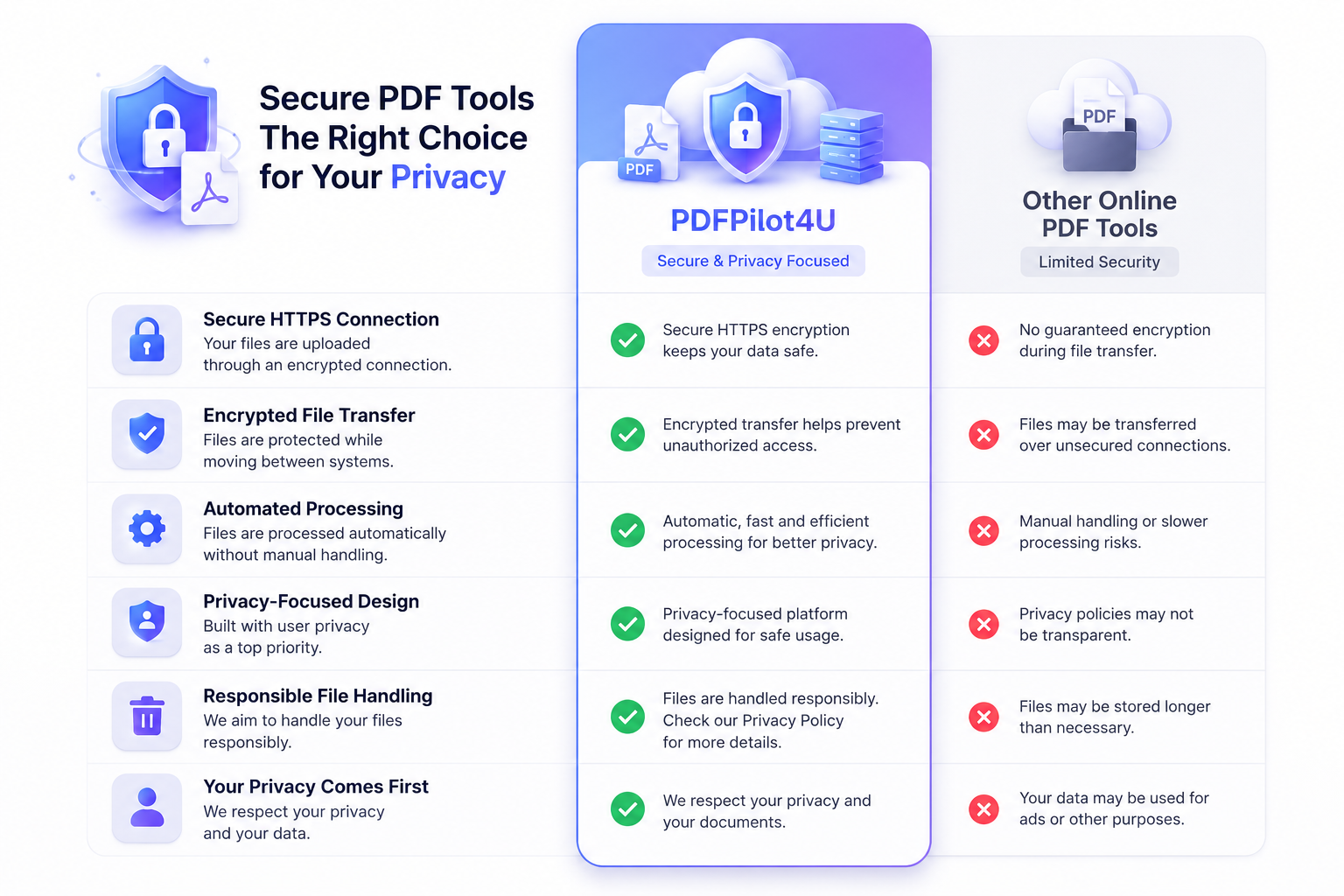
Secure HTTPS Connection
Whenever you upload a document, your browser communicates through a secure HTTPS connection.
HTTPS encrypts data while it travels between your device and the server, helping reduce the risk of interception during transmission.
This secure connection is now considered an essential standard for trustworthy online services.
Protected File Transfer
Secure file transfer plays an important role in online document processing.
Instead of sending information over unsecured connections, encrypted communication helps safeguard uploaded files while they move between systems.
This provides an additional layer of protection throughout the upload and download process.
Automated Processing
Your files are processed automatically by the platform.
Automation reduces unnecessary handling and helps complete PDF tasks quickly and efficiently.
Whether you're compressing a large PDF or converting multiple images into one document, automated workflows help deliver fast results.
Privacy-Focused Design
Good PDF services prioritize user privacy.
Rather than focusing only on document conversion, privacy-focused platforms are designed to minimize unnecessary exposure to uploaded files and help users maintain control over their documents.
Automatic File Cleanup
One important aspect of online privacy is how uploaded files are managed after processing.
Reliable PDF tools should avoid keeping user documents longer than necessary.
Removing processed files after an appropriate period helps reduce unnecessary storage of personal information and supports better privacy practices.
If you're working with confidential business documents or personal records, automatic cleanup policies add another layer of confidence.
Your Privacy Comes First
Privacy is more than protecting files during upload.
It also includes responsible handling of your information throughout the entire workflow.
A privacy-focused PDF platform should strive to:
- Process files securely
- Minimize unnecessary storage
- Protect uploaded documents
- Respect user confidentiality
- Provide secure access to processed files
This helps create a safer experience for individuals, freelancers, students, and businesses alike.
Best Practices for Keeping Your PDFs Secure
Even when using secure PDF tools, following good security habits is essential.
Here are some practical tips:
- Upload files only to trusted websites.
- Check for HTTPS before uploading documents.
- Avoid public Wi-Fi when handling confidential files.
- Protect sensitive PDFs with passwords whenever possible.
- Download your processed files promptly.
- Delete unnecessary copies from shared computers.
- Keep your browser updated.
- Use strong passwords for your online accounts.
- Regularly review important documents stored on your devices.
- Be cautious before sharing download links.
Small security habits can significantly improve your online privacy.
Why Businesses Choose Secure PDF Tools
Businesses process thousands of PDF documents every month.
These may include:
- Employee records
- Contracts
- Purchase orders
- Vendor agreements
- Payroll documents
- Compliance reports
- Client proposals
- Financial statements
Choosing secure PDF tools helps organizations streamline document workflows while supporting better privacy practices.
PDF Security for Students and Professionals
Students often upload:
- Assignments
- Research papers
- Certificates
- Project reports
Professionals frequently upload:
- Presentations
- Invoices
- Business proposals
- Contracts
- Reports
Regardless of the document type, protecting personal information remains important.
Why Online PDF Privacy Matters More Than Ever
As digital collaboration continues to grow, more documents are shared online than ever before.
From remote work to online education and digital business operations, PDFs have become the standard format for exchanging information.
That makes online document security an essential consideration rather than an optional feature.
Choosing reliable PDF tools helps users work confidently while reducing privacy risks.
Final Thoughts
Your documents often contain valuable personal, academic, financial, or business information. Choosing a platform that prioritizes PDF security, online document privacy, and secure PDF processing helps you work with greater confidence.
At PDFPilot4U, we believe productivity and privacy should go hand in hand. Whether you're converting files, compressing PDFs, merging documents, or organizing important paperwork, our goal is to provide a smooth, reliable, and security-conscious experience.
Ready to manage your PDFs with confidence? Explore PDFPilot4U's powerful online tools to convert, merge, compress, organize, and optimize your PDF documents while keeping security and privacy at the forefront.
Frequently Asked Questions
Is PDFPilot4U safe to use?
PDFPilot4U is designed with secure document processing and user privacy in mind, helping users manage PDF files with confidence.
Why is HTTPS important?
HTTPS encrypts communication between your browser and the website, making file transfers more secure.
Can I upload confidential documents?
Confidential documents should only be uploaded to trusted platforms that prioritize security and privacy.
What is PDF security?
PDF security refers to the technologies and practices used to protect documents during upload, processing, storage, and download.
Are online PDF converters safe?
Reputable online PDF converters that use secure connections and privacy-focused practices are generally safer than unknown or untrusted services.
Should businesses use secure PDF tools?
Yes. Businesses regularly handle confidential information and benefit from secure document workflows.
How can I improve PDF privacy?
Use trusted services, avoid public Wi-Fi, protect sensitive files with passwords, and keep your devices updated.
Why should I choose PDFPilot4U?
PDFPilot4U offers a fast, user-friendly experience for converting, merging, compressing, and organizing PDFs while emphasizing secure document handling and privacy-focused practices.